Lynx by Tigera AI agent security on Kubernetes

Find every AI agent. Stop any of them, instantly.

Lynx runs in the same Kubernetes clusters as your AI agents, with no code changes. One install gives platform engineering, AI and security teams what they need.

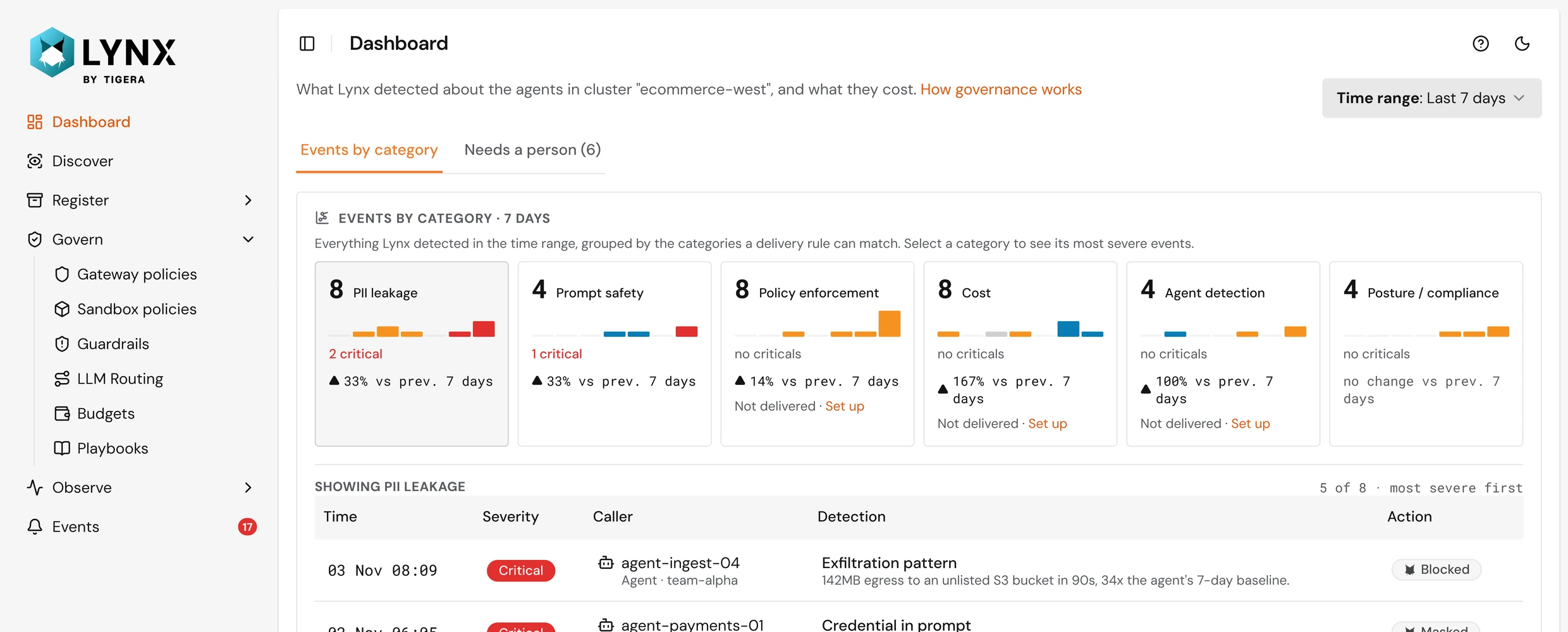
Lynx dashboard: events by category for the agents in a cluster, with the most severe events listed below

How Lynx works

One Helm install. Two layers of protection.

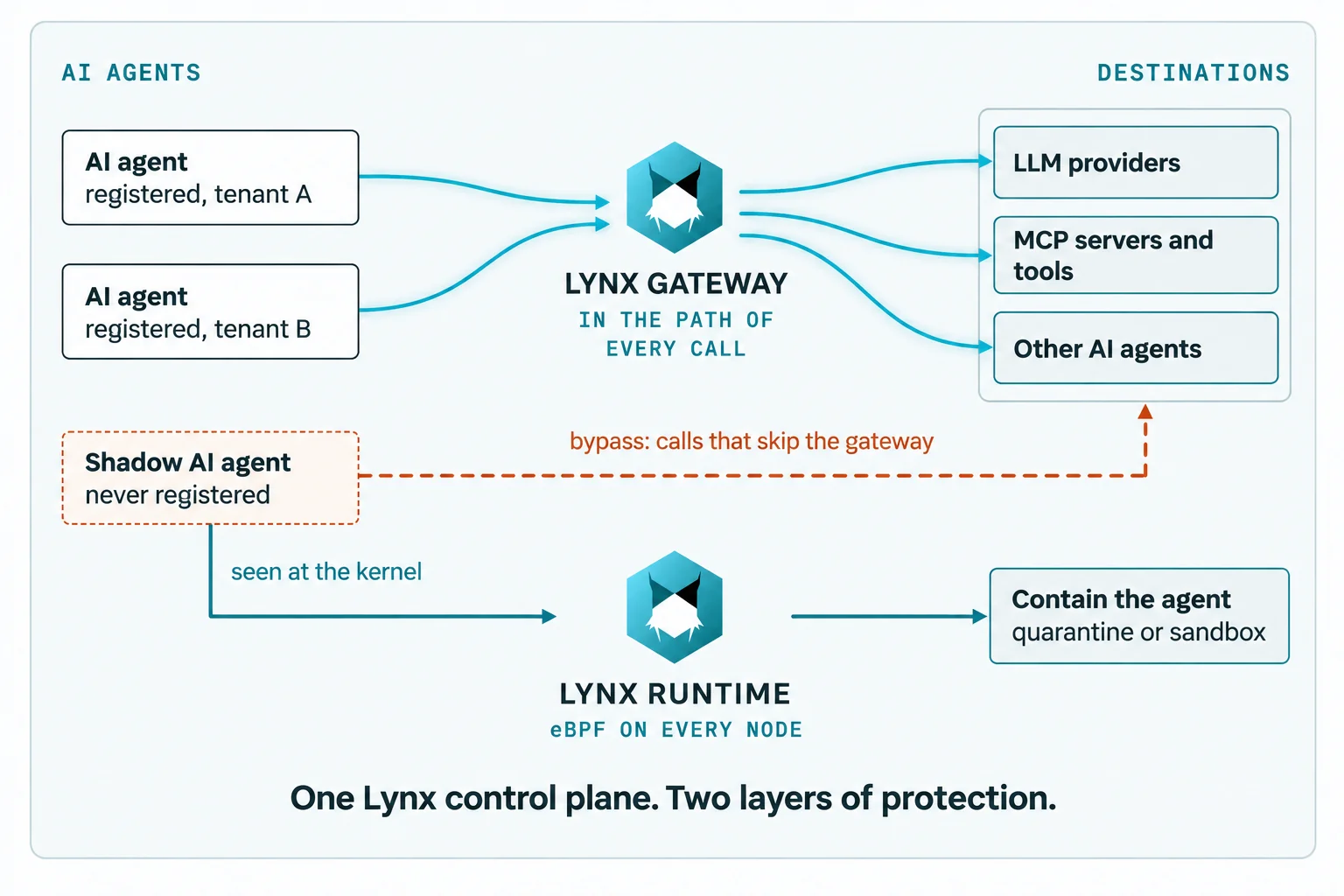
Lynx Gateway checks every call routed through it. Lynx Runtime runs on every node and catches what the gateway can't see: agents nobody registered, and calls that skip the gateway.

  1. Discover

    Find AI agents running in your clusters, even those that aren't registered. Lynx Runtime provides kernel-level visibility and evidence of their activity.

  2. Register

    Assign each agent an owner and identity using your existing identity provider or Lynx. Quarantine agents that aren't authorized.

  3. Govern

    Control which models, tools, and other agents each agent can access. Enforce policies through Lynx Gateway, with runtime sandboxing and quarantine for additional protection.

  4. Observe

    Track agent activity, access requests, and policy decisions in a unified audit trail that integrates with your existing tools.

Lynx architecture: registered AI agents call LLM providers, MCP servers and other agents through Lynx Gateway. A shadow agent that bypasses the gateway is seen at the kernel by Lynx Runtime (eBPF on every node), which can quarantine or sandbox it. One Lynx control plane, two layers of protection.

Beyond the gateway

Agent security shouldn’t stop at the gateway.

AI gateways secure the traffic that passes through them. Lynx secures AI agents at runtime, directly at the infrastructure layer—even when their activity bypasses the gateway.

  1. Discover every agent, even the ones that skip the gateway

    Lynx Runtime uses eBPF to find agents the moment they start, by what they load and which models they call. Every connection is tied to the agent that made it, so a call that skips Lynx Gateway gets flagged.

    Every finding comes with a confidence band and the evidence behind it.

  2. A sandbox for the agents you already run

    Set per-agent limits, enforced in the kernel, on which programs an agent can run, which files it can write and where it can connect. Start in monitor mode, then enforce.

    Secure the agents you already run. No code changes or image rebuilds.

  3. Quarantine one agent, not the whole tenant

    A quarantined agent can’t run processes, write files or connect to anything: no models, no tools, no other agents. No other agent can reach it, and its tenant keeps running.

    Lifting quarantine takes one click. No redeploys.

  4. Playbooks that respond at machine speed

    A playbook quarantines or sandboxes any agent, registered or not, above the confidence threshold you set, before anyone opens a ticket.

    You choose the trigger and the action, and every response is logged as an event.

How Lynx compares to gateway-only tools

What you needGateway-only toolsLynx by Tigera
Agents nobody registered Only if they route through it Found from the kernel
Calls that skip the gateway Not seen Seen and tied to the agent
Limits inside the agent No Kernel sandbox, per agent
Stop one agent mid-run Block its calls Quarantine the workload, no redeploy
Automatic response Per-call rules Playbooks for all agents

One Lynx, three teams

Platform teams run it. AI teams ship on it. Security signs off.

One install and one shared record of every agent and every call. Each team uses Lynx for the job it already owns.

Platform engineering

Make AI agents a supported workload, not an exception.

Lynx Discover view: a radar of the AI agents seen in a cluster, with one discovered agent's confidence score and details alongside
  • Closer to the center means more signals confirm it's an agent
  • Unregistered agents stand out
  • The evidence behind each finding
  • Register or quarantine in one click
  • Install once per cluster. One Helm chart puts Lynx Gateway, Lynx Runtime and the registry in your cluster. Runs alongside any CNI on EKS, GKE, AKS, OpenShift and SUSE Rancher.
  • Get the number. Run discovery and see every AI agent in the cluster. Give each one an owner, or let a playbook handle the unknowns.
  • Write the rules once. Default-deny policy, kept in Git like the rest of your platform. One rule can cover a whole class of agents by label.
  • Contain at the right level. From one blocked call to a quarantined agent, pick the response that fits. Everything else keeps running.

AI teams

Ship AI agents with the access they need.

Lynx gateway policy builder: a rule that lets agents call other agents when the role is Finance, with the same policy in Cedar code alongside
  • Allowed models and tools
  • A bulk export denied
  • A high-value refund held for a person
  • The same policy in Cedar, editable either way
  • Point your agent at Lynx. No SDK, no rewrite. Your agent reaches models, MCP tools and other agents through a Lynx URL.
  • Give agents the access they need. Define which models, tools, and services each agent can access. Set clear boundaries without slowing development.
  • Ship with checks built in. Lynx can check every model call for prompt injection and PII by the moderation service you already run, or by Lynx's own rules. Flagged calls are blocked, masked, or held for a person to approve.
  • Observe every call and what it costs. Every call's tokens, tools, cost and verdict in one trail. Set a budget, get warned before you hit it, and cap any agent before a runaway loop runs up the bill.

Security can say yes to real access, because any agent can be stopped mid-run.

Security teams

Say yes to AI agents, with the record to back it.

Your platform team runs Lynx. You set the policy and get the evidence, all inside your own clusters, without needing another console to watch.

Lynx Agent Trail: an audit log of agent requests, with one expanded to show a call blocked when a person denied approval
  • Who the agent acted for
  • Each step's policy decision and the line that made it
  • One refusal, one approval by a person
  • Export to OpenTelemetry
  • Set the bar. Default-deny: no call goes through unless a policy allows it. Review policies before they go live.
  • Trust the decision. Every allow or deny comes from Cedar policy, not an LLM. Same request, same answer, every time.
  • Catch what policy can't. Lynx Runtime detects agent activity that bypasses the gateway and can contain agents mid-execution. Prompt injection and PII checks add another layer of protection, detecting malicious instructions and sensitive data in permitted model calls.
  • Get the record. Every request in one trail: which agent, on behalf of which user (OBO) at every hop, what it touched, and why each step was allowed or refused. Exported over OpenTelemetry to the tools you already run.

Try Lynx on your own Kubernetes clusters

Discover AI agents running in your Kubernetes clusters. See their activity, set security boundaries, and contain unsafe behavior—all in your own environment.

FAQ

What engineers ask first

How does Lynx tell an AI agent from a regular microservice?

It looks at what a workload has and what it does: the agent frameworks it loads, the model providers it calls, and the settings that point to them. Each signal adds to a confidence score, and Lynx shows which signals counted.

Does Lynx decrypt your agents' traffic?

Lynx Runtime doesn't. It reads only the destination name from the TLS handshake, never the content. For governed calls, Lynx Gateway terminates TLS to check policy, then re-encrypts to the provider.

Which identity and model providers does Lynx work with?

Your existing identity provider for users. For agents, bring your own identity or let Lynx supply one. Models: OpenAI, Anthropic, Google Gemini and any OpenAI-compatible endpoint.

Does Lynx replace your API or AI gateway?

No. Keep the gateway you run. Lynx governs the calls that reach Lynx Gateway and catches the AI agents that go around any gateway.

Do you need Calico?

No. Lynx runs alongside any CNI. If you run Calico, Lynx runs alongside it too.

Does Lynx cover laptops and desktops?

No. Lynx is for AI agents running on your servers: containers in your clusters, found and governed where they run. It isn't a sensor for end-user devices.

Where does Lynx run? Is it SaaS?

Self-hosted only, in your own Kubernetes clusters, installed with Helm. Nothing it records leaves your environment.

Try it on your own clusters

Find out how many AI agents you're running.

Discover AI agents running in your Kubernetes clusters. See their activity, set security boundaries, and contain unsafe behavior—all in your own environment.

X